
Vivimate vs TiviMate: Subscription or App? (2026)
Vivimate vs TiviMate confuses everyone: one is the IPTV subscription, the other is a player app. The real difference, whether you need both, and how they pair.
Type "vivimate" into Google and half the results end up arguing about TiviMate. The names rhyme, both show up in every IPTV setup, and plenty of people assume they are rivals, or worse, the same product. They are not. One is the subscription. The other is the app you watch it in. Get that one distinction straight and the whole IPTV world suddenly makes sense.
Here is the honest, no-jargon version.
The one-line answer
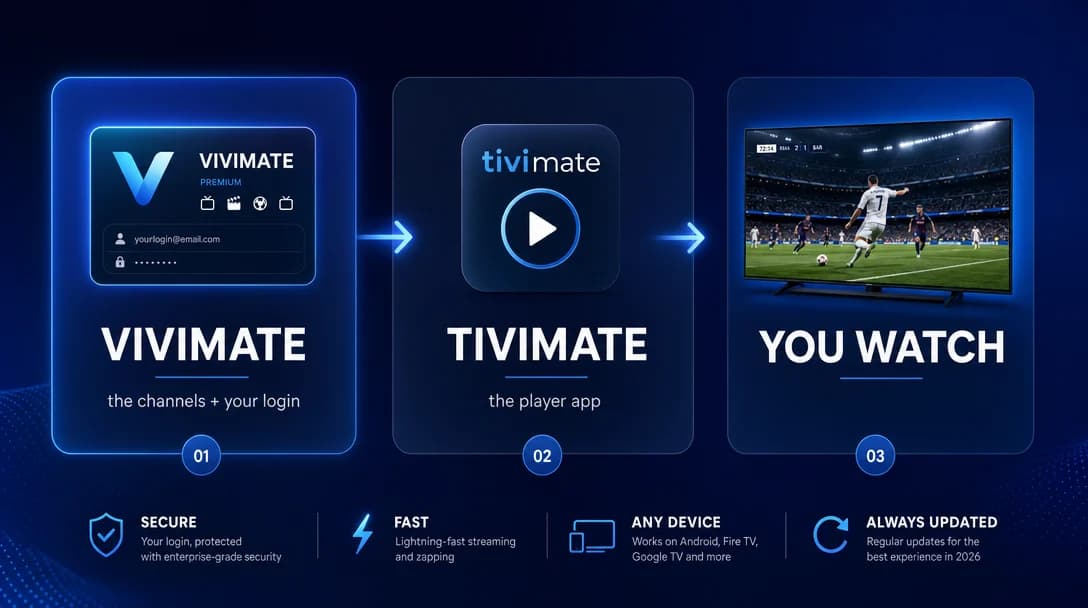
Vivimate is the IPTV subscription, the actual channels, sport and movies plus the login that unlocks them. TiviMate is a player app, the on-screen guide and remote you watch through. They are not competitors. They sit on different layers, and most people end up using one inside the other.
What TiviMate actually is
TiviMate is a player. Think of it as the dashboard: a clean, cable-style channel grid, a 7-day EPG (the TV guide), favourites, recording on some setups, and a remote-friendly layout built for the Fire TV Stick and Android TV. It is widely rated the best-looking IPTV player going.
But here is the catch nobody tells beginners: TiviMate ships with zero channels. Open it fresh and it is an empty shell. It has nothing to play until you feed it a subscription. There is a free version and a one-time "Premium" unlock for extras like multiple playlists and recording, but neither buys you a single channel. TiviMate is the screen, not the signal.
What Vivimate is
Vivimate is the subscription, the part that actually gives you something to watch. One prepaid plan unlocks roughly 40,000 live channels, a large on-demand library, and the full sports calendar in up to 4K, delivered through a login (M3U or Xtream Codes) you paste into the player of your choice.
Crucially, Vivimate is player-agnostic. The same login works in TiviMate, IPTV Smarters Pro, IBO Player Pro and the rest, so you are never locked into one app. Want proof it is a real, legitimate service and not one of the copycats? We covered exactly that in is Vivimate legit.
So do you need both?
This is where the "vs" framing falls apart. To watch IPTV you need two things: a subscription (the signal) and a player (the screen). Vivimate is the first. TiviMate is one excellent option for the second, but only one option.
- Love a polished, cable-like guide on a Fire Stick or Android TV? Pair Vivimate + TiviMate. It is the combo most of our customers run.
- On an iPhone, iPad, a Samsung or LG smart TV, or you just want zero fuss? Use Vivimate in IPTV Smarters Pro, IBO Player Pro or your TV's built-in player instead. TiviMate is not required.
So it was never Vivimate or TiviMate. It is Vivimate (always) plus whichever player you like (often TiviMate).
Vivimate vs TiviMate, side by side
| Feature | Vivimate | TiviMate |
|---|---|---|
| What it is | The IPTV subscription (the channels) | An IPTV player app (the screen) |
| What you actually get | ~40,000 live channels, VOD, sport, your login | A polished guide and EPG, nothing to watch on its own |
| Channels included? | Yes, that is the whole point | No, you bring your own subscription |
| Typical cost | From $13.99/mo, 14-day money-back | Free tier, optional one-time Premium unlock |
| Devices | Any IPTV app, any device | Mainly Fire TV and Android TV |
| Works without the other? | Yes, use any player you like | No, it needs a subscription to play anything |
How they work together (the 2-minute setup)
Once you have a Vivimate plan, your login lands in your dashboard the moment payment clears. In TiviMate you choose Add playlist, then Xtream Codes, paste your server URL, username and password, and the channels plus the guide load themselves. Full walkthrough: how to set up Vivimate. And if TiviMate is not on your Fire Stick yet, start with installing TiviMate on Firestick.
The bottom line
Stop picturing a fight. TiviMate is a beautiful remote control with no TV behind it; Vivimate is the TV. Buy the subscription, drop it into whatever player suits your screen, and you are watching in minutes. TiviMate is a lovely way to do that, it is just not the only way, and it is never the thing you are paying for the channels.
Ready to give the player something to play? See Vivimate plans, or read real customer reviews first.
Frequently asked questions
Is Vivimate the same as TiviMate?
No. Vivimate is the IPTV subscription (the channels plus your login); TiviMate is a player app you watch through. TiviMate has no channels of its own, so it needs a subscription like Vivimate to play anything.
Do I need TiviMate to use Vivimate?
No. Vivimate works in any IPTV player, TiviMate, IPTV Smarters Pro, IBO Player Pro, or your smart TV's built-in player. TiviMate is just a popular, polished option, not a requirement.
Is TiviMate free, and is Vivimate free?
TiviMate has a free version plus an optional one-time Premium unlock, but it includes no channels. Vivimate is a paid subscription from $13.99/mo that provides the channels, with a 14-day money-back guarantee.
How do I put Vivimate into TiviMate?
In TiviMate choose Add playlist then Xtream Codes, and paste the server URL, username and password from your Vivimate dashboard. The channels and TV guide load automatically. See our Vivimate setup guide for the full steps.
Which is better, Vivimate or TiviMate?
It is not either/or, they do different jobs. You need a subscription (Vivimate) and a player (TiviMate is one of the best). Together they give you the full cable-style experience.
Written by the Vivimate Team
We run Vivimate, the 4K IPTV service, and set these apps and devices up every day for customers around the world. Every guide here is written and checked by the same people who answer support, so the steps are the ones we actually use. Got a question we did not cover? Reach the team.
Ready to start streaming?
Roughly forty thousand feeds, around 200K on-demand titles, true 4K, live in 60 seconds.